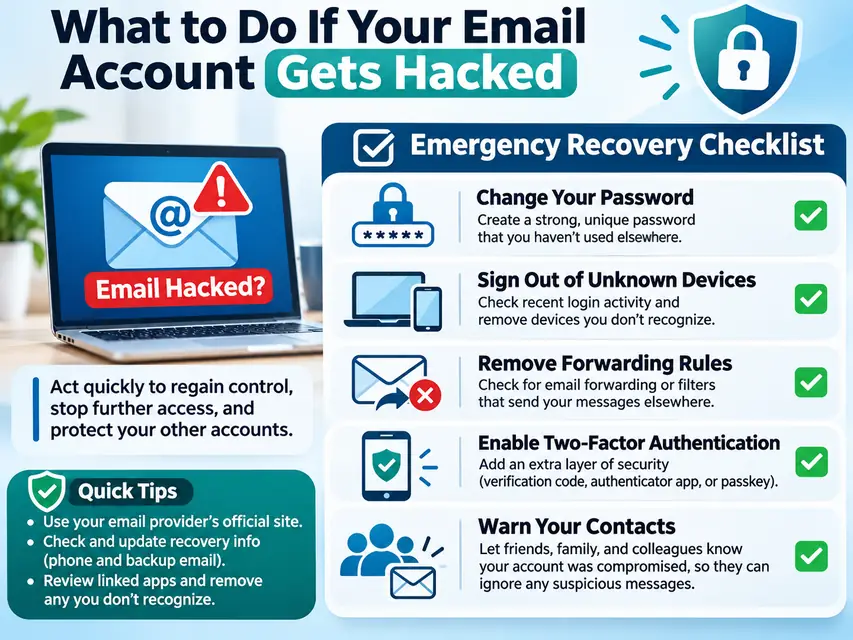
What to Do If Your Email Account Gets Hacked: A Step-by-Step Recovery Guide
You open your inbox and notice something strange. There are emails you never sent. A password-reset notification appears from a shopping website. Your friend messages you asking why you sent them a suspicious link.
Then you try to sign in—and your password no longer works.
Your email account may have been compromised.
This is more serious than losing access to your inbox. Your email address may be connected to your bank, credit cards, shopping accounts, social media, cloud storage, and other important services.
If someone gains control of your email, they may be able to reset passwords, intercept security notifications, impersonate you, and access other accounts.
The good news is that taking the right steps quickly can help limit the damage.
This guide walks you through what to do, in the order that matters, how to recover your account, and how to protect your other online accounts.
1. First, Understand What May Have Happened
Not every unusual email notification means someone has successfully hacked your account.
You might have received a failed login alert because someone guessed your password. Alternatively, a criminal may have successfully signed in, changed your settings, or taken control of your inbox.
Start by identifying what you are experiencing.
| What you notice | What it could mean |
|---|---|
| Unfamiliar login alert | Someone attempted to access your account |
| Password changed without permission | Possible account takeover |
| Emails sent without your knowledge | Someone may be using your account |
| Recovery phone or email changed | A criminal may be trying to lock you out |
| Missing emails | Messages may have been deleted or moved |
| Friends receive strange messages | Your account may be sending spam or scams |
| You cannot sign in | Your password or account recovery details may have been changed |
Do not ignore these warning signs, especially when several happen together.
2. The First 15 Minutes: Stop Further Damage
If you suspect your email account has been compromised, do not waste time replying to suspicious messages or trying random recovery websites.
Follow these steps first.
Step 1: Use a trusted device
If you suspect your computer or phone has malware, avoid entering new passwords on that device until it has been checked.
Use another trusted, updated device if possible.
If there is no indication that your device is compromised, you can proceed from your usual device after checking it.
Step 2: Open your email provider's official website
Go directly to the service you use.
For example:
-
Gmail: https://mail.google.com/
-
Outlook: https://outlook.live.com/
-
Yahoo Mail: https://mail.yahoo.com/
Do not use recovery links sent by an unexpected caller or stranger.
Step 3: Try to sign in
If you can still access your account, immediately begin securing it.
If your password no longer works, use your provider's official account recovery process.
Do not pay anyone claiming they can hack your account back or guarantee recovery.
Step 4: Change your password
Create a new, unique password that you have never used on another website.
A long passphrase or a password generated by a reputable password manager is a good choice.
If you used the compromised password elsewhere, those accounts may also be at risk.
Important: Changing your password alone may not remove every existing login session or malicious setting. Continue through the recovery checklist.
3. If You Are Locked Out, Recover Your Email Account
If a criminal has changed your password, recovery phone number, or backup email, you may need to prove your identity to your email provider.
Use the official recovery process for your service.
Recover a hacked Gmail account
Visit:
https://accounts.google.com/signin/recovery
Google's recovery process may ask you to confirm your identity through a recovery email address, phone number, or other account information.
Use a familiar device and browser when possible, and answer the recovery questions as accurately as you can.
Official guidance:
https://support.google.com/accounts/answer/6294825
Recover a hacked Outlook or Hotmail account
Visit:
https://account.live.com/password/reset
If you cannot verify your identity through the normal recovery process, use Microsoft's account recovery form:
Microsoft may ask for information that helps establish account ownership.
Recover a hacked Yahoo Mail account
Visit:
https://login.yahoo.com/forgot/
Follow the account recovery instructions using the recovery information associated with your account.
Recovery warning: Never share recovery codes, verification links, or passwords with someone claiming to be technical support. Use the official provider's website.
4. The First Hour: Remove the Hacker's Access
Getting back into your inbox does not necessarily mean the problem is solved.
A criminal may have added another recovery address, connected an unfamiliar application, or created email rules that secretly forward your messages.
Review these settings carefully.
Check your signed-in devices
Open your account's security settings and review devices and recent login activity.
Look for:
-
Devices you do not recognize
-
Login locations that do not make sense
-
Unusual sign-in times
-
Unknown browsers or applications
-
Sessions that remain active after the password change
Sign out of unfamiliar sessions and use the option to sign out of all other devices if available.
Check recovery information
Review your account's recovery email address and phone number.
Remove any address or number you did not add.
Make sure your own recovery information is correct and accessible.
Check automatic email forwarding
This is one of the most important steps.
A hacker may create an automatic forwarding rule that sends copies of your incoming emails to another address.
That means even after you change your password, the criminal may continue receiving sensitive messages if the rule remains active.
Look for:
-
Unknown forwarding addresses
-
Automatic forwarding settings you did not enable
-
Rules that move or delete security notifications
-
Filters that hide messages from banks or other services
Remove any settings you do not recognize.
Review connected applications
Some email services allow third-party applications to access your account.
Review connected apps and services. Revoke access for anything unfamiliar or unnecessary.
Also check for unfamiliar app passwords, email aliases, and other account permissions.
Check your sent, deleted, and archived folders
Look for emails you did not send.
Also check whether important messages have been deleted, archived, or moved into unfamiliar folders.
If you find suspicious activity, save evidence such as screenshots, dates, and message details.
5. Protect Your Other Accounts Before the Hacker Gets There
Your email account is often the recovery key to your digital life.
Think about what someone could access if they control your inbox.
They may request password resets for:
-
Online banking
-
Credit card accounts
-
Amazon and other shopping accounts
-
Facebook and Instagram
-
Apple or Google accounts
-
Cloud storage
-
Subscription services
-
Work or business accounts
Make a list of your most important accounts and secure them one by one.
Prioritize financial accounts
If your email was connected to banking or payment services, review those accounts immediately.
Look for unfamiliar transactions, new payment recipients, changes to contact information, or password-reset notifications.
Contact your bank using the number on your card or its official website if you notice anything suspicious.
Change reused passwords
If the hacked email password was used on other websites, change those passwords too.
Do not simply add a number or symbol to the old password. Create a genuinely different password for every important account.
Secure your phone and mobile carrier account
Check that your mobile phone number and account recovery settings have not been changed.
If you suspect someone has taken control of your phone number or SIM, contact your wireless carrier through its official support channel.
6. Turn On Two-Factor Authentication
A strong password is important, but it is not always enough.
Two-factor authentication (2FA), also called multifactor authentication (MFA), adds another security step when you sign in.
Depending on the service, this may involve:
-
An authenticator application
-
A security key
-
A passkey
-
A verification notification
-
A one-time code
Where available, consider using a passkey or hardware security key. These can offer strong protection against phishing.
If you use SMS verification, remember that text messages can be vulnerable to SIM-swapping attacks.
Never share a verification code with someone who contacts you unexpectedly.
7. Warn Your Friends, Family, and Business Contacts
A hacked email account can become a tool for attacking other people.
Criminals may send messages that appear to come from you.
For example:
"Hi, I need a quick favor. Can you send me some money? I'll explain later."
Or:
"Please check this document. Open the link below."
Your contacts may trust the message because it comes from your real email address.
Once your account is secure, warn people who may have received suspicious messages.
You can use this message:
Subject: Important: My Email Account Was Compromised
"My email account was recently compromised. If you received any unusual messages, links, attachments, or requests for money from me, please do not open them or respond. I am securing my account now. If you need to contact me, please use my phone number or another verified method."
If you use the email account for business, also notify customers, colleagues, vendors, or anyone who may have received fraudulent payment instructions.
8. What If the Hacker Used Your Email to Steal Money or Personal Information?
Sometimes an email compromise is part of a larger identity theft or financial fraud incident.
If you discover unauthorized purchases, bank transfers, or changes to financial accounts, contact the relevant bank or payment provider immediately.
Ask them to:
-
Secure your account
-
Review suspicious transactions
-
Stop or investigate unauthorized transfers
-
Replace compromised cards if necessary
-
Update your account security
If you believe your Social Security number or other identity information was stolen, visit:
https://www.identitytheft.gov/
The Federal Trade Commission's IdentityTheft.gov service provides a recovery plan based on the information you report.
You may also consider freezing your credit with all three major credit bureaus:
-
Equifax: https://www.equifax.com/
-
Experian: https://www.experian.com/
-
TransUnion: https://www.transunion.com/
A credit freeze is free and can make it harder for someone to open new credit accounts in your name.
9. How to Find Out How Someone Got Into Your Email
After securing your account, consider how the compromise happened.
Common possibilities include:
A fake login page: You received an email or text that looked like it came from Google, Microsoft, or another service. You entered your password on a fraudulent website.
A reused password: Another website experienced a data breach, and criminals tried the exposed password on your email account.
Malicious software: A suspicious application, attachment, or download may have compromised your device or captured your login information.
A stolen verification code: Someone tricked you into sharing a one-time code or approving an unexpected login request.
An unsecured device: Someone who had access to your phone or computer may have accessed your account.
Update your operating system, browser, and applications. Run a reputable security scan if you suspect malware.
Do not download unknown security tools advertised in pop-ups or unsolicited messages.
10. Your 24-Hour Email Recovery Checklist
Once the immediate threat is under control, use this checklist to make sure you have not missed anything.
-
Recover access to your email account.
-
Set a new, unique password.
-
Sign out of unfamiliar devices and other sessions.
-
Check recovery phone numbers and email addresses.
-
Remove suspicious forwarding rules and filters.
-
Review connected apps and app passwords.
-
Check sent, deleted, and archived messages.
-
Enable two-factor authentication or a passkey.
-
Change reused passwords on other accounts.
-
Review bank and shopping account activity.
-
Warn friends, family, and business contacts.
-
Update your devices and run a security scan.
-
Save evidence and report any financial or identity theft.
11. Where Can You Report a Hacked Email Account in the United States?
If your email account was compromised, the following official resources can help.
Federal Trade Commission (FTC) https://ReportFraud.ftc.gov/ Report scams, impersonation, and fraud involving your compromised account.
IdentityTheft.gov https://www.identitytheft.gov/ Get a recovery plan if someone stole your personal or financial information.
FBI Internet Crime Complaint Center (IC3) https://www.ic3.gov/ Report internet-related crimes, including online fraud and financial losses.
Google Account Help https://support.google.com/accounts/answer/6294825 Get official guidance for securing a compromised Google account.
Microsoft Account Help https://support.microsoft.com/account-billing Find official recovery and security assistance for Microsoft accounts.
If the compromised account belongs to your employer or organization, notify your IT or security team immediately. Do not try to hide the incident or delete evidence.
Frequently Asked Questions
How do I know if my email account has been hacked?
Look for unfamiliar login alerts, password changes you did not make, emails sent without your permission, missing messages, changed recovery information, or unexpected forwarding rules.
Can someone hack my bank account through my email?
A compromised email account can make it easier for criminals to reset passwords or intercept account notifications. However, access to email alone does not automatically give someone access to your bank account. Secure both accounts and contact your bank if you see suspicious activity.
Should I delete my hacked email account?
Not immediately. First, try to recover it through the provider's official process. You may need the account to recover other services and preserve evidence. If recovery is impossible, create a new account and update important services and contacts.
Can changing my email password remove a hacker?
Changing your password is an important step, but it may not remove existing sessions, connected applications, forwarding rules, or changed recovery details. Review all account security settings.
Can hackers read my old emails?
If someone gained access to your inbox, they may have been able to read messages stored there. Review sensitive account notifications and consider which other services could have been exposed.
What should I do if a hacker is demanding money?
Do not pay or negotiate based only on threats. Save the messages, secure your accounts, and report the incident. If the message contains a threat to publish private information, consider getting appropriate legal or law-enforcement assistance.
Can I recover a permanently locked email account?
Recovery depends on the provider and the available evidence that you own the account. Follow the official recovery process and provide accurate information. No legitimate recovery service can guarantee that every account will be restored.
Final Thoughts: Your Email Account Is More Important Than You Think
Your email address is not just a place where you receive messages. It is often the central connection between your identity, finances, shopping accounts, subscriptions, and digital services.
When someone takes control of it, the consequences can spread quickly.
If you suspect your email has been hacked, act in the right order:
-
Recover access.
-
Change your password.
-
Remove the intruder's access and hidden settings.
-
Secure your financial and other important accounts.
-
Warn your contacts.
Most importantly, do not assume that changing your password solves everything. Check forwarding rules, recovery details, connected applications, and active sessions.
Your inbox may be the gateway to your entire digital life. Protect it accordingly.
 The BriefWire