How to Spot a Fake Delivery Text While You Are Waiting on a Package
The holiday shopping season is one of the busiest times of the year for package deliveries. Millions of people in the United States are ordering gifts, electronics, clothing, and household items online. With so many packages moving, scammers send fake delivery texts to people who are waiting on a real box.
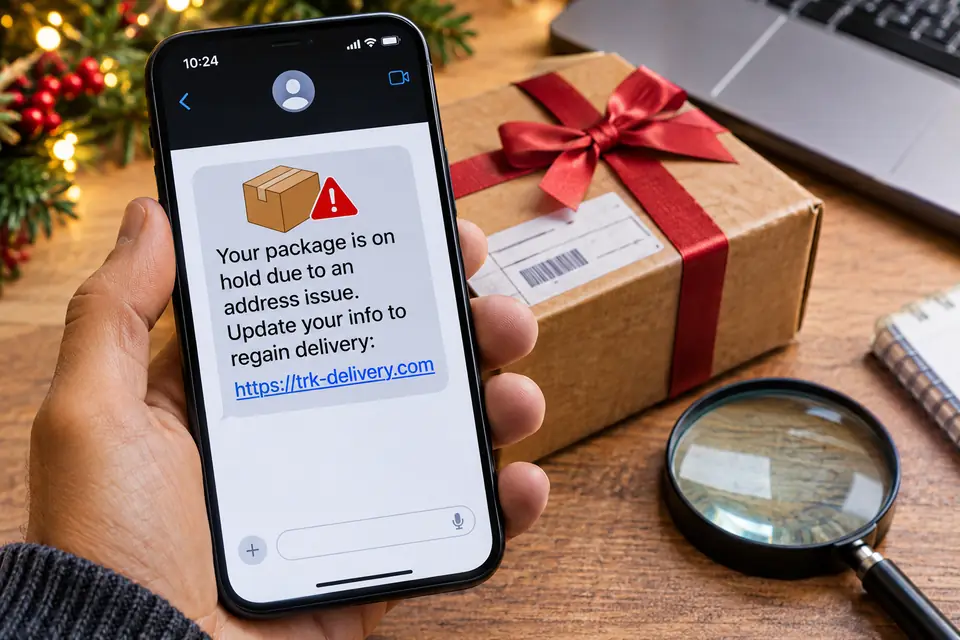
You might get a message saying your package could not be delivered, your address is incomplete, or a small redelivery fee is required. The message may use the name of a familiar delivery company.
Before you tap anything, stop and check. The text may be a package-delivery scam aimed at your card number, your password, or other personal information.
Here is how to recognize a fake delivery message and what to do while you wait for a package.
1. Watch out for an unexpected delivery problem
A common warning is a text that says something is wrong with a delivery you were not asked about.
Scammers often use lines such as:
- “Your package delivery has been delayed.”
- “Your address is incomplete. Update your information.”
- “Your parcel is waiting for confirmation.”
- “Your delivery attempt was unsuccessful.”
- “Pay a small redelivery fee to receive your package.”
These lines are meant to make you worry that a gift or an important order will miss the holiday.
Even if you are expecting a package, do not treat the text as proof. Scammers send the same message to thousands of phone numbers. Some of those people happen to have an order on the way.
2. Do not judge the message by the sender name
Look at the number, then set it aside.
A text that claims to be from USPS, UPS, FedEx, or Amazon may come from a mobile number you do not know. A familiar name on the text is not proof. Scammers can make the sender line look official.
Do not use the number or the link in the message. Open the carrier’s website or app yourself.
3. Never pay a redelivery fee through a text link
This is one of the clearest signs of a delivery scam.
The text may say your package is held until you pay a small fee. It may demand $0.30, $0.50, or $1.99. That amount is part of the scam. It is not a real USPS, UPS, or FedEx redelivery charge.
The payment page can collect your card number, expiration date, security code, and billing address. Some fake sites also ask for details that can be used for identity theft.
Do not enter payment information from an unexpected delivery text. If you want to know whether any fee is real, sign in on the carrier’s own website or app.
4. Look at the link before you open it
Fake delivery messages often use links that imitate a shipping site.
A fraudulent address may include words such as “USPS,” “parcel,” “delivery,” or “tracking” and still belong to someone else. A real USPS page uses usps.com. UPS uses ups.com. FedEx uses fedex.com. Amazon uses amazon.com. A link that only hides those words inside a different address is not the real site.
Watch for:
- Misspelled company names
- Extra words in the domain
- Unusual endings
- Shortened links that hide the destination
- A page that asks for payment or personal information as soon as it opens
A page can copy a logo and familiar colors and still be fake. Do not treat the design as proof.
5. Check the package on the official site
The status that matters is the one on the store where you ordered, or on the carrier’s own site.
For customers in the United States, open these yourself:
- USPS: https://www.usps.com/
- UPS: https://www.ups.com/
- FedEx: https://www.fedex.com/
- Amazon: https://www.amazon.com/
Type the address or open the official app. Use the tracking number from your order receipt, not a number that arrived only inside the text.
You can also open the retailer’s order history and read the status there.
If that page shows the package moving, and no fee due, ignore the text.
6. Slow down when the text demands a deadline
Scammers know a delayed holiday package makes people act fast. They use lines such as:
- “Final delivery attempt today.”
- “Your package will be returned within 24 hours.”
- “Immediate action required.”
- “Your parcel will be cancelled unless you respond.”
The deadline is there so you tap before you check. A real delay still shows on the tracking page you open yourself. Read that page before you answer the text.
7. Do not share personal information or verification codes
A fake delivery page may ask for more than a fee.
It might request your:
- Full name and home address
- Credit or debit card information
- Email address and password
- Social Security number
- Bank account details
- One-time passwords or verification codes
A delivery update does not need your account password or a bank verification code. Do not give a one-time code to anyone who claims to be from a delivery company.
8. What to do when the text arrives
- Do not tap the link.
- Do not reply.
- Do not send payment or personal information.
- Open the order on the retailer’s website.
- Check the tracking number on the carrier’s website.
- Report the message.
- Block the sender after you report it.
In the United States, forward the suspicious text to 7726 (SPAM). You can also report it to the Federal Trade Commission at https://reportfraud.ftc.gov/.
For a message that pretends to be USPS, email it to spam@uspis.gov, or report it at https://www.uspis.gov/.
9. What to do if you already tapped the link
What you do next depends on what you typed.
If you only opened the link:
Close the page. Do not download a file, allow notifications, or enter information. If a file already downloaded, do not open it.
If you entered a credit or debit card:
Call the bank or card company using the number on the back of the card. Say you may have typed the card into a fraudulent page. Ask them to block or replace the card and review recent charges.
If you entered a password:
Change it on the real website, the one you type yourself. If you used that same password anywhere else, change those accounts too. Turn on multifactor authentication where the account offers it.
If you shared a Social Security number or other identity details:
Use https://www.identitytheft.gov/ for the federal steps on identity theft.
If you installed an app or a file from the message:
Remove it, and do not keep using it. If you are unsure it is gone, ask someone you trust who handles computer security.
Acting the same day limits the chance of a charge or a stolen account.
10. Habits that help during holiday deliveries
- Track orders inside the retailer account you already use.
- Install carrier apps from the official app store, not from a text.
- Leave unexpected shipping links untapped.
- Do not pay a delivery fee that arrived by text.
- Keep your phone and browser updated.
- Use a different password for each shopping account.
- Turn on multifactor authentication.
- Read bank and card transactions for charges you do not recognize.
- Report the message. Do not forward it to friends as a curiosity without a warning, or they may tap it too.
Tell family members who shop on their phones, especially anyone who gets anxious about a late gift. A polished fake can look ordinary.
Final thoughts
A holiday package should be something you track, not something a stranger’s text controls. The rule is simple: do not trust an unexpected delivery text just because you are waiting on a box.
Open the order at the store. Read the tracking page on the carrier’s own site. Never type a card, a password, or a verification code into a page that arrived by text.
A minute of checking protects the payment card and the account.
Frequently asked questions
1. How can I tell if a USPS delivery text is real?
See whether you signed up for USPS tracking texts, then compare the claim with the status on usps.com. Be suspicious of an unexpected link that asks for payment or personal information.
2. Does USPS send text messages about delivery problems?
USPS can send text tracking updates when you request them for a tracking number. An unexpected text that asks you to pay or to enter personal information should be checked on usps.com, not through the link in the text.
3. Why did I get a fake package text if I did not order anything?
Scammers send the same text to large lists of numbers. They do not need to know that you placed an order.
4. What number should I forward a scam delivery text to?
In the United States, forward it to 7726 (SPAM). You can also report it at https://reportfraud.ftc.gov/.
5. Can a fake delivery text steal bank information?
Yes. The page behind the link can copy a tracking screen and collect your card details, passwords, or other personal information.
6. Should I delete a suspicious delivery text?
Report it first. Forward it to 7726, or use your phone’s spam report. Then delete it and block the sender.
 The BriefWire