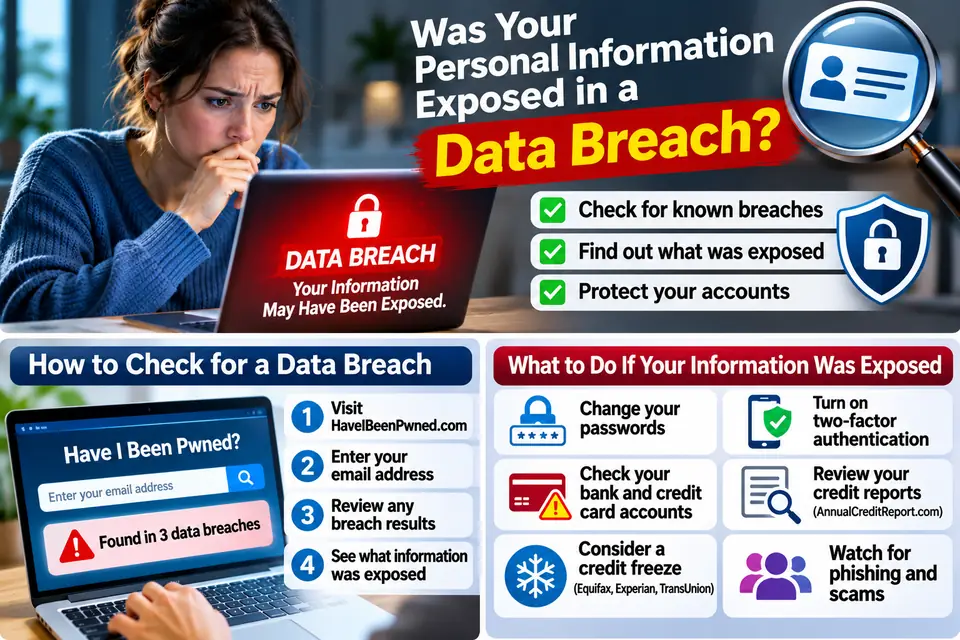
How to Check Whether Your Personal Information Was Exposed in a Data Breach
You receive an email from a company you recognize. The subject line says:
"Important Security Notice: Your Personal Information May Have Been Exposed."
The message explains that the company experienced a data breach and that customer information may have been accessed by unauthorized individuals.
You start wondering:
-
Was my email address stolen?
-
Could someone have my password?
-
Was my Social Security number exposed?
-
Can criminals access my bank or credit card accounts?
-
How can I find out what information was leaked?
These are important questions. A data breach does not automatically mean someone has stolen your identity, but exposed information can create opportunities for phishing, account takeovers, financial fraud, and identity theft.
The challenge is knowing what was exposed and what to do next.
In this guide, we'll show you how to check whether your personal information appeared in known data breaches, how to verify a breach notification, and how to protect yourself if your information was compromised.
1. First, Understand What a Data Breach Really Means
A data breach happens when sensitive or private information is accessed, disclosed, or acquired without authorization.
This can happen when criminals break into a company's computer systems, exploit a security weakness, steal employee login credentials, or gain access to an improperly secured database.
A breach may expose different types of information, including:
| Information exposed | Possible risk |
|---|---|
| Email address | Phishing and targeted scam emails |
| Username and password | Unauthorized account access |
| Phone number | Scam calls, texts, and impersonation |
| Full name and address | Identity fraud and targeted scams |
| Date of birth | Identity verification attacks |
| Social Security number | Identity theft and fraudulent credit applications |
| Bank account details | Financial fraud |
| Credit or debit card details | Unauthorized purchases |
| Medical information | Medical identity theft and privacy risks |
Not every breach exposes all these details.
For example, one incident may expose only email addresses, while another may include names, home addresses, passwords, and financial information.
The first thing you need to find out is exactly which information was involved.
2. Start by Checking Your Email Address for Known Data Breaches
Your email address is often the easiest starting point when checking for exposure.
One widely used service is Have I Been Pwned.
Visit:
Follow these steps:
-
Open the official website.
-
Enter your email address.
-
Select the search option.
-
Review the results.
-
Check which known breaches included your email address and what types of information were exposed.
The service may show the names of affected websites, the approximate breach dates, and categories of exposed information.
For example, your email address might appear in a breach involving an online shopping website, an old social media service, or a subscription platform.
What does a positive result mean?
It means your email address appeared in information associated with a breach or exposure included in the service's database.
It does not automatically mean someone currently has access to your email account.
It also does not prove that every piece of information associated with you was exposed.
What if the result says your email was not found?
That is encouraging, but it is not a guarantee that your information has never been exposed.
No public breach-checking database contains every incident. Some breaches are never discovered, never publicly reported, or have not yet been added to a searchable database.
Use the result as one security check, not a complete identity-protection test.
3. Check Whether Your Password Has Appeared in a Data Breach
Your email address is only part of the picture.
A more serious problem occurs when a password you still use appears in previously exposed data.
Criminals may use stolen passwords in automated login attempts against other websites. This is known as credential stuffing.
For example:
You created an account on an online shopping website several years ago and used the same password for your email and banking accounts.
That shopping website later suffers a breach.
If the password is exposed, criminals may try it on other services.
How to check an exposed password
Have I Been Pwned also provides a separate password-checking service:
https://haveibeenpwned.com/Passwords
The service checks whether a password has appeared in known breached password datasets.
Important safety rules:
-
Never enter your current banking password into a random breach-checking website.
-
Never send your password to someone who claims to be checking it for you.
-
Do not use a password you already know has been exposed.
-
If a password was reused, change it on every account where it was used.
A password appearing in a breach database does not necessarily mean someone knows which account currently uses it. However, it should no longer be used.
4. Check Official Data Breach Notifications
Sometimes you do not need to search for a breach yourself. The company involved may contact you directly.
You might receive a notification from:
-
A bank or credit card company
-
A healthcare provider
-
An insurance company
-
An online retailer
-
A social media platform
-
A government agency
-
An employer or service provider
A legitimate breach notification may explain:
-
What happened
-
When the incident occurred
-
What information may have been exposed
-
Which customers or accounts were affected
-
What actions the company has taken
-
What steps customers should take
-
Whether free credit monitoring or identity protection is being offered
How to verify the notification
Do not automatically trust an email or text just because it uses a company's logo.
Scammers sometimes send fake data breach notifications to steal passwords and personal information.
Instead:
-
Do not click suspicious links in the message.
-
Open the company's official website independently.
-
Look for its security notice or data breach announcement.
-
Contact customer support using a verified phone number.
-
Confirm whether your account or customer information was affected.
If the company offers free identity monitoring after a breach, check the enrollment instructions and deadline through an independently verified channel.
5. Find Out Exactly What Information Was Exposed
A data breach notification should help you understand what information may have been involved.
This matters because different types of exposed information require different protective actions.
If only your email address was exposed
Be alert for phishing emails, fake password-reset notifications, and suspicious messages pretending to come from companies you use.
Do not assume that your email password was also stolen.
If your password was exposed
Change it immediately on the affected website.
If you reused it elsewhere, change it on those accounts too.
Enable multifactor authentication where available.
If your phone number was exposed
Watch for unexpected verification messages, account recovery requests, and calls pretending to be from your bank or mobile carrier.
Consider adding a PIN or account security protection with your wireless provider.
If your Social Security number was exposed
Take this seriously because Social Security numbers can be used in identity theft and fraudulent credit applications.
Consider placing a credit freeze with all three major credit bureaus.
You can also visit:
https://www.identitytheft.gov/
If your bank or card information was exposed
Contact the financial institution through its official website or the phone number on your card.
Ask whether your card or account needs additional protection, replacement, or monitoring.
Review recent transactions for anything you do not recognize.
6. Check Whether Someone Is Using Your Identity
Finding your email address in a breach is one thing. Discovering that someone has opened an account or borrowed money in your name is much more serious.
If your Social Security number or other identity details were exposed, review your credit reports.
In the United States, you can obtain free credit reports through the federally authorized website:
https://www.annualcreditreport.com/
Review your reports for:
-
Credit cards you never opened
-
Loans you do not recognize
-
Unknown collection accounts
-
Unfamiliar addresses
-
Incorrect personal details
-
Credit inquiries you did not authorize
If you find something suspicious, contact the relevant lender or credit bureau and report the issue.
Remember that a credit report may not show every form of identity misuse. Continue monitoring your bank accounts, tax-related notices, and other important services.
7. Freeze Your Credit to Make Identity Theft More Difficult
If your Social Security number or other sensitive identity information was exposed, a credit freeze is one of the most useful precautions available to US consumers.
A credit freeze restricts access to your credit file for most new-credit applications. This can make it harder for someone to open new credit accounts in your name.
A freeze is free to place and lift.
You need to contact each of the three major credit bureaus separately:
Equifax
https://www.equifax.com/personal/credit-report-services/credit-freeze/
Experian
https://www.experian.com/freeze/center.html
TransUnion
https://www.transunion.com/credit-freeze
A credit freeze does not prevent every type of identity theft or unauthorized activity. It also does not stop someone from using an existing account.
However, it is an important protective step when your identity information has been exposed.
8. Watch Out for Scams After a Data Breach
A data breach can create another opportunity for criminals.
They may use exposed information to make scams more convincing.
For example, a scammer might know your name, email address, phone number, or the company you use.
They may contact you pretending to be:
-
Your bank's fraud department
-
A credit bureau
-
A government agency
-
A data breach investigation team
-
A credit monitoring company
-
Technical support
They may say they can protect your identity, remove your information from the internet, or recover stolen money.
Then they ask you to pay a fee, install remote-access software, share a verification code, or provide your bank details.
Be especially careful if someone contacts you unexpectedly and claims to know exactly which company exposed your information.
Never pay an unexpected caller to protect your identity or share a verification code to prove who you are.
Contact the organization independently using its official website or phone number.
9. What to Do If Your Information Was Exposed
Use this action plan if you discover that your information appeared in a data breach.
For the first 30 minutes
-
Identify which information was exposed.
-
Change any exposed passwords.
-
Change reused passwords on other accounts.
-
Secure your primary email account.
-
Enable multifactor authentication.
-
Contact your bank if financial information was involved.
During the first 24 hours
-
Review recent banking and credit card transactions.
-
Check your credit reports if sensitive identity details were exposed.
-
Place a credit freeze if your Social Security number may have been compromised.
-
Follow the instructions in the company's verified breach notice.
-
Enroll in legitimate free monitoring services offered as part of the breach response, if appropriate.
During the following weeks
-
Monitor account activity and financial statements.
-
Watch for suspicious calls, emails, and text messages.
-
Review new credit inquiries and unfamiliar accounts.
-
Keep records of suspicious transactions and communications.
-
Follow up with the affected company if you need clarification.
10. Where to Get Help After a Data Breach in the United States
These official resources can help you check exposure, protect your identity, and report fraud.
Federal Trade Commission — Data Breach Recovery
https://www.identitytheft.gov/databreach
The FTC provides guidance based on the type of information exposed and explains what steps to take.
Have I Been Pwned
Check whether your email address appears in known data breaches.
AnnualCreditReport.com
https://www.annualcreditreport.com/
Request your official free credit reports from the three major credit bureaus.
IdentityTheft.gov
https://www.identitytheft.gov/
Create a recovery plan if your personal information has been misused.
Federal Trade Commission — Report Fraud
Report identity theft, phishing, impersonation, and other scams.
Consumer Financial Protection Bureau
https://www.consumerfinance.gov/complaint/
Submit complaints about financial institutions and financial products.
11. Frequently Asked Questions
How can I check if my personal information was exposed in a data breach?
Start by checking your email address through Have I Been Pwned. Review official breach notifications from companies you use, and check your credit reports if sensitive identity information may have been exposed.
Is Have I Been Pwned safe to use?
It is a widely used breach-notification and search service. Its public email search is designed to identify known breach records without displaying the underlying exposed passwords. However, use the official website and never enter your banking credentials or other sensitive information into unfamiliar websites.
Does a data breach mean my identity has been stolen?
No. A breach means information was exposed or accessed without authorization. Identity theft happens when someone uses your personal information fraudulently. A breach increases risk, but it does not prove that misuse has occurred.
What should I do if my Social Security number was exposed?
Visit IdentityTheft.gov for guidance, consider freezing your credit with Equifax, Experian, and TransUnion, and monitor your credit reports for unfamiliar accounts or inquiries.
Can I remove my information from a data breach?
You generally cannot erase the historical fact that your information appeared in a breach. You can ask the affected company about its response, secure your accounts, and take steps to reduce the risk of future misuse.
What if a breach checker says my email was not exposed?
Do not assume you are completely safe. Public breach databases do not contain every incident. Continue using unique passwords, multifactor authentication, and account monitoring.
Should I pay for identity theft protection after a data breach?
Not necessarily. First check whether the affected company offers free credit monitoring or identity protection. You can also use free credit reports and credit freezes. Compare any paid service carefully before subscribing.
Can scammers use leaked personal information to impersonate me?
Yes. Criminals may combine exposed names, email addresses, phone numbers, and other details to create convincing messages or impersonate you. Be cautious with unexpected requests for money, passwords, and verification codes.
Final Thoughts: Knowing What Was Exposed Is the First Step
A data breach can be unsettling, especially when you do not know what information criminals may have obtained.
But you do not need to panic or assume the worst.
Start with your email address. Check official breach notifications. Find out whether passwords, financial details, or sensitive identity information were involved.
Then take action based on the information exposed.
Change compromised passwords, secure important accounts, review your credit reports, and consider a credit freeze if your Social Security number was exposed.
Most importantly, remember that criminals may use leaked information months or even years after an incident to make their scams appear genuine.
Do not wait until someone opens an account in your name. Check your exposure, secure your accounts, and protect your identity today.
 The BriefWire