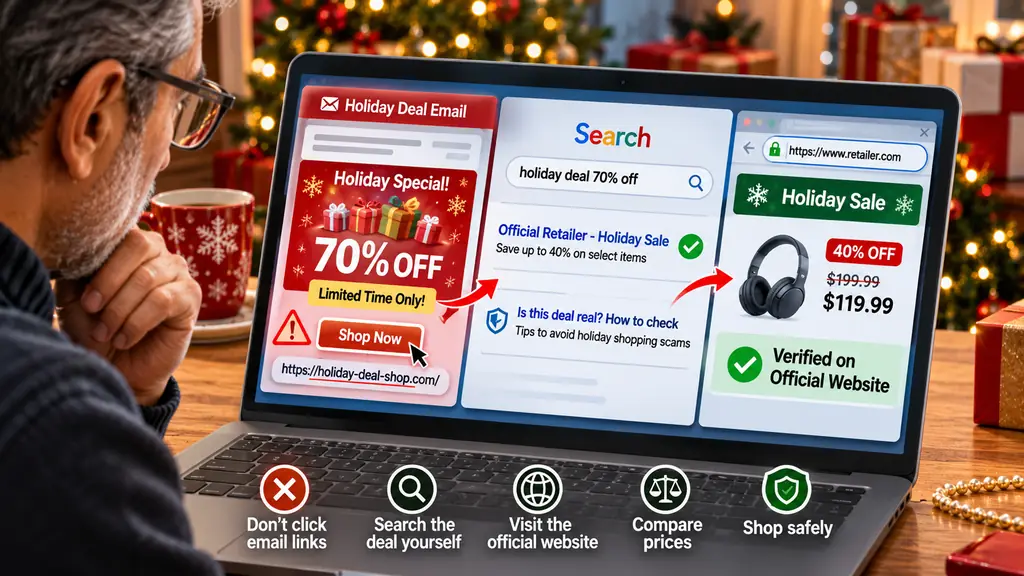
How to Check a Holiday Deal Without Clicking the Link in the Email
Holiday shopping brings exciting discounts, limited-time offers, and special promotions from retailers across the United States. Your inbox may fill up with emails advertising Black Friday bargains, Cyber Monday deals, Christmas sales, free shipping, and exclusive holiday coupons.
But not every offer is genuine.
Scammers often send fake promotional emails designed to look like messages from popular retailers. These emails may advertise unbelievable discounts, claim that you have won a shopping voucher, or warn that a special offer will expire within minutes.
The biggest mistake you can make is clicking the link before checking whether the offer is legitimate.
Fortunately, you do not need to click an email link to verify a holiday deal. You can check the offer directly through the retailer's official website, mobile app, or customer service channels.
Here is how to do it safely.
1. Open the Retailer's Website Yourself
The safest way to check a holiday promotion is to visit the retailer's website directly.
For example, if you receive an email advertising a 70% discount at a popular online store:
-
Do not click the promotional link.
-
Open a new browser tab.
-
Type the retailer's official website address yourself.
-
Navigate to its sale or promotions section.
-
Search for the advertised product or discount.
If the deal is genuine and publicly available, you may find it on the retailer's website.
For additional safety, use a website address you already know or one listed on the retailer's verified social media account.
2. Check the Retailer's Official Mobile App
Many major retailers publish their holiday promotions through their official mobile apps.
If you receive an email about a special discount, open the retailer's app directly instead of following the email link.
Look for:
-
Holiday sale announcements.
-
Limited-time discount codes.
-
Exclusive app promotions.
-
Product price reductions.
-
Free shipping offers.
-
Coupon and rewards programs.
Make sure the app comes from the official retailer and is downloaded through the Apple App Store or Google Play Store.
A promotion that appears in the official app is generally easier to verify than an unexpected email link.
3. Examine the Sender's Email Address
Before trusting an offer, look carefully at the sender's actual email address.
Scammers frequently use addresses that resemble legitimate retailer addresses.
For example:
-
A genuine-looking display name may hide an unrelated email address.
-
A scammer may use extra words or misspellings in a domain.
-
A promotional email may claim to come from a well-known retailer but use a completely different domain.
Do not rely only on the sender's display name or company logo.
You can inspect the sender's full email address by opening the message details in your email application.
However, even an apparently legitimate sender address is not absolute proof that an email is safe. Email addresses can sometimes be spoofed or compromised.
4. Search for the Exact Deal on Google
You can also independently search for a promotion without opening the email link.
Suppose an email advertises:
"Get 60% Off All Winter Jackets – Holiday Special."
Open Google and search for:
"60% off winter jackets holiday sale" followed by the retailer's name.
Compare the results with the offer in your inbox.
Look for:
-
The same product.
-
The same discount percentage.
-
The same promotional dates.
-
The same coupon code.
-
The same shipping conditions.
Pay attention to sponsored search results. A search result being an advertisement does not automatically mean the website is legitimate.
Check the website domain carefully before visiting it.
5. Be Suspicious of Discounts That Look Too Good to Be True
Scammers understand that shoppers are attracted to large discounts.
A fake holiday email might advertise:
-
A $1,200 laptop for $199.
-
A $500 smartphone for $49.
-
A luxury watch at 90% off.
-
A free gift card worth $500.
-
An expensive gaming console at an unbelievable price.
These offers are designed to encourage quick decisions.
Before purchasing, compare the advertised price with the retailer's regular price and prices from other established sellers.
A large discount is not automatically fraudulent, but an unusually low price combined with an unfamiliar website, urgency, or unusual payment requirements should raise concerns.
6. Check the Coupon Code Without Following the Email Link
Some promotional emails provide coupon codes that can be verified independently.
For example, an email may advertise:
"Use HOLIDAY50 to receive 50% off your purchase."
Instead of clicking the email's shopping button:
-
Visit the retailer's official website.
-
Add the advertised product to your shopping cart.
-
Enter the coupon code in the checkout area.
-
Check whether the discount is applied.
-
Review the final price before making a purchase.
A valid coupon code can help confirm that an offer exists, although a working code alone does not prove that the original email was authentic.
Never enter payment information on an unfamiliar website just to test a coupon.
7. Contact Customer Service Directly
If you cannot find the advertised offer on the official website or app, contact the retailer directly.
Use the customer service phone number or support page listed on its official website.
Ask whether:
-
The promotion is currently active.
-
The coupon code is valid.
-
The advertised product is included.
-
The discount has an expiration date.
-
The email was sent by the retailer.
Do not use a phone number or support link provided in a suspicious email.
8. Watch for Common Holiday Email Scam Warning Signs
Fake promotional emails often contain several warning signs.
Urgent language
Messages such as "Last chance," "Claim within 10 minutes," or "Your reward expires today" are designed to pressure you.
Unexpected gift cards
An email claiming that you have won a gift card without entering a competition deserves extra caution.
Unusual payment methods
Be suspicious if a supposed retailer asks for gift cards, cryptocurrency, wire transfers, or other unusual payment methods.
Requests for sensitive information
A promotional offer should not require your Social Security number, bank login, or email password.
Poorly matched website addresses
A retailer's logo may look authentic while the website address leads somewhere completely different.
One warning sign does not automatically prove fraud, but several warning signs together should make you stop and investigate.
9. What to Do If You Have Already Clicked a Suspicious Email Link
If you accidentally clicked a promotional link, do not panic. Take action based on what happened.
If you only opened the website:
Close the page. Do not download files, allow notifications, or enter personal information. Keep your browser and security software updated.
If you entered your password:
Change it immediately using the retailer's official website. If you reused that password elsewhere, update those accounts too. Enable multifactor authentication.
If you entered credit card information:
Contact your bank or card issuer immediately. Explain that your payment details may have been exposed and ask about blocking or replacing the card.
If you downloaded a suspicious file:
Do not open it. Remove it safely and scan your device with trusted security software.
If you shared sensitive identity information:
Visit IdentityTheft.gov for official guidance on protecting your identity.
10. Report Suspicious Holiday Shopping Emails
If you receive a suspicious promotional email, you can report it instead of interacting with it.
For people in the United States:
-
Federal Trade Commission: https://ReportFraud.ftc.gov/
-
Anti-Phishing Working Group: reportphishing@apwg.org
-
Google Gmail: Use the Report phishing option.
-
Microsoft Outlook: Use the Report phishing option.
Reporting suspicious emails helps security organizations identify and respond to fraudulent campaigns.
A Simple Holiday Deal Verification Checklist
Before trusting a holiday discount, ask yourself:
-
Did I visit the retailer's website independently?
-
Can I find the same offer on its official website or app?
-
Does the sender's email address look consistent with the retailer?
-
Is the advertised coupon code valid?
-
Is the price realistic compared with other retailers?
-
Does the promotion avoid requesting unnecessary personal information?
-
Am I being pressured to act immediately?
If you cannot independently verify the offer, do not use the email link.
Final Thoughts
Holiday deals can help you save money, but scammers know that shoppers are looking for bargains and may be more likely to act quickly during busy shopping periods.
The safest approach is simple: Do not click first and investigate later. Verify first and shop afterward.
Open the retailer's official website or app, search for the advertised promotion, check the coupon code, and contact customer service if necessary.
You can enjoy holiday discounts without putting your money, personal information, or online accounts at risk.
Frequently Asked Questions
1. How can I check whether a holiday discount email is real?
Visit the retailer's official website or mobile app independently. Search for the advertised offer and compare its discount, coupon code, and promotional dates.
2. Is it safe to open an email from a well-known retailer?
Not necessarily. Scammers can imitate well-known companies. Check the sender's full address and verify the offer independently before interacting with it.
3. Can I verify a coupon code without clicking an email link?
Yes. Visit the retailer's official website, add the relevant product to your cart, and test the code at checkout.
4. What should I do if a holiday deal looks too good to be true?
Compare prices with established retailers, check the offer on the seller's official website, and avoid unusual payment requests.
5. Should I unsubscribe from suspicious promotional emails?
Do not click the unsubscribe link in a suspicious email because it may confirm that your address is active. Report it as phishing and delete it instead.
6. Where can I report a fake shopping email in the United States?
You can report fraudulent shopping emails to the FTC at ReportFraud.ftc.gov or forward phishing emails to reportphishing@apwg.org.
 The BriefWire